We are continuing to improve MiniTooly with better tools, more useful features, and a smoother experience for every user.
This update focuses on QR codes and barcodes.
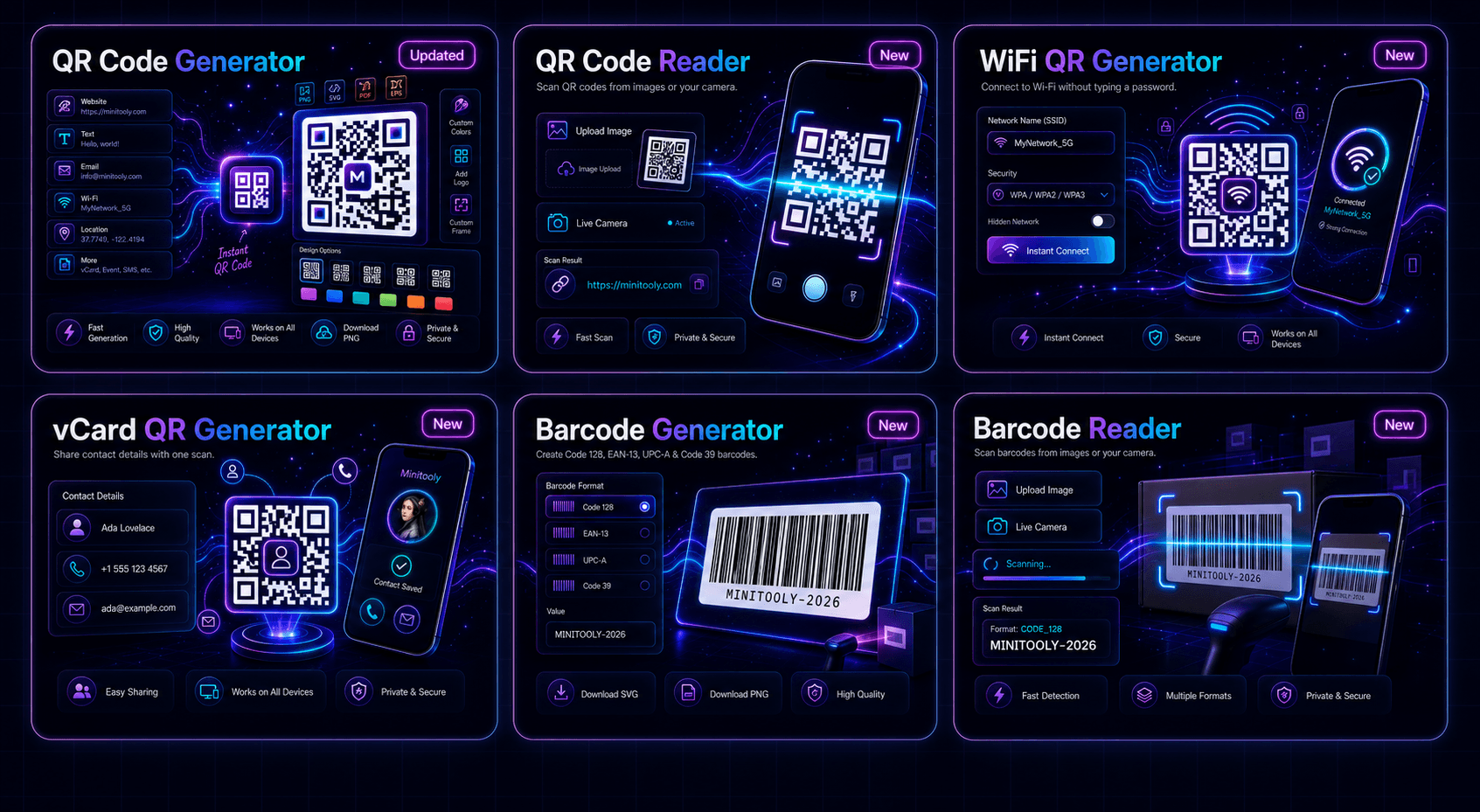
We improved our existing QR Code Generator and added five completely new tools:
- QR Code Reader
- WiFi QR Generator
- vCard QR Generator
- Barcode Generator
- Barcode Reader
Whether you need to create, scan, share, or read QR codes and barcodes, MiniTooly now gives you more ways to complete the task directly in your browser.
Updated: QR Code Generator
Our QR Code Generator was already available on MiniTooly, but it has now received a major update.
The improved version gives users more control over the final QR code and makes the entire creation process easier.
You can create QR codes for:
- website URLs;
- plain text;
- email addresses;
- WiFi information;
- locations;
- contact details;
- events;
- SMS messages;
- and other types of content.
The updated tool also provides more customization options, including:
- custom colors;
- different QR styles;
- logo support;
- frame options;
- multiple download formats.
The goal of this update was not simply to change the design.
We wanted to make the QR Code Generator more flexible, useful, and easier to understand.
New: QR Code Reader
The new QR Code Reader allows you to scan QR codes from an image or directly through your device camera.
You can:
- upload an image containing a QR code;
- use your camera for live scanning;
- view the detected result;
- quickly open or copy the scanned content.
This is useful when you receive a QR code as a screenshot, image, document, or printed card.
Instead of installing a separate application, you can scan it directly in your browser.
New: WiFi QR Generator
Sharing WiFi access should not require typing a long password.
The new WiFi QR Generator lets you create a QR code containing your network details.
You can add:
- the WiFi network name;
- the password;
- the security type;
- hidden network settings.
After scanning the generated QR code, users can connect to the WiFi network much faster.
This can be useful for:
- homes;
- offices;
- cafés;
- restaurants;
- hotels;
- events;
- shared workspaces.
New: vCard QR Generator
The new vCard QR Generator helps you share contact information with a single scan.
You can include details such as:
- full name;
- phone number;
- email address;
- company;
- job title;
- website;
- address.
When someone scans the QR code, they can quickly save the contact information on their device.
It is especially useful for:
- business cards;
- professional events;
- networking;
- portfolios;
- company websites;
- email signatures.
New: Barcode Generator
The new Barcode Generator allows you to create barcodes for different types of data.
It supports common barcode formats such as:
- Code 128;
- EAN-13;
- UPC-A;
- Code 39.
You can enter a value, choose the required format, generate the barcode, and download it for later use.
This can be useful for:
- product labels;
- inventory management;
- packaging;
- internal tracking;
- tickets;
- printed materials.
New: Barcode Reader
The new Barcode Reader lets you scan barcodes from images or with your camera.
You can:
- upload a barcode image;
- use live camera scanning;
- detect the barcode format;
- view the decoded value;
- copy the result.
This makes it easier to read product codes, inventory labels, tickets, and other barcode-based information without installing additional software.
Built for Speed and Simplicity
All of these tools were designed around the same MiniTooly principles:
- fast performance;
- simple interfaces;
- browser-based processing;
- mobile-friendly layouts;
- easy access;
- no unnecessary steps.
Users should be able to open a tool, complete the task, and continue their work without confusion.
Works Across Devices
The updated QR Code Generator and all five new tools work across modern devices.
You can use them on:
- desktop computers;
- laptops;
- tablets;
- smartphones.
Camera-based tools are especially useful on mobile devices, while image upload options are convenient for desktop users.
Why We Added These Tools
QR codes and barcodes are used everywhere.
They help people share information, connect to networks, save contacts, identify products, and access digital content.
Instead of offering only one QR Code Generator, we wanted to create a more complete collection of tools for both creation and scanning.
Now MiniTooly supports the full workflow:
- create a QR code;
- scan a QR code;
- create a WiFi QR code;
- share contact details;
- generate a barcode;
- read a barcode.
More Improvements Are Coming
This release is part of our ongoing effort to improve MiniTooly.
We will continue updating existing tools, adding new utilities, and making the platform faster and easier to use.
Our goal is simple:
Give users the right tool for every task, without unnecessary complexity.
Thank you for using MiniTooly!